根据国家留学基金管理委员会规定,中国政府奖学金生需在“中国政府奖学金来华留学管理信息系统”(以下简称“管理系统”)完成线上注册。请同学们认真阅读本通知内容,并按时完成相关要求。
According to the current policy of China Scholarship Council (CSC), from this year the Chinese Government Scholarship students have to complete the online registration through the “Chinese Government Scholarship Information System”, hereinafter referred to as “the system”. All the CSC students please read this notice carefully and complete the relevant requirements on time.
一、注册时间 Registration time: 2025年9月3日-2025年9月12日 Sept. 3 to 12, 2025
二、注册对象 Types of students included:
我校所有注册并且享受中国政府奖学金的学生,包括新生和老生
All Chinese Government Scholarship students who have finished registration in the university, including both new and continuing students
三、注册流程 Registration Process:
所有政府奖学金生需于注册时间内使用CSC登记号登录中国政府奖学金管理系统(https://studyinchina.csc.edu.cn/#/login)完成线上注册。
All CSC international students should use their CSC numbers to log in the system (https://studyinchina.csc.edu.cn/#/login) to complete the online registration within due time.
具体步骤如下:
The online registration should be done with the following steps.
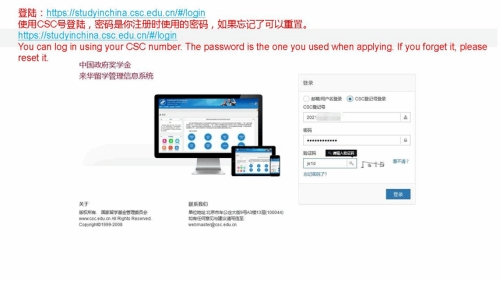
步骤1:使用CSC号登录中国政府奖学金管理系统(https://studyinchina.csc.edu.cn/#/login ),密码为申请奖学金时注册的账号密码;如果忘记了可以重置。
Step 1: Log in the system with your CSC number(https://studyinchina.csc.edu.cn/#/login). The password is the same as the one of your account created for applying scholarship. If you forget it, please reset it.
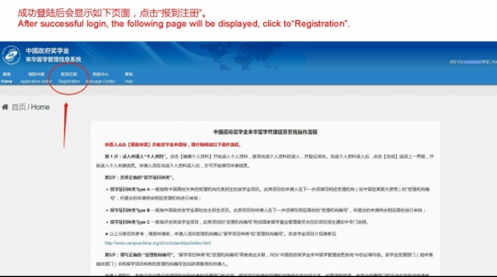
步骤2:登录后,在页面中左上角菜单栏处点击“报到注册”;
Step 2: After log-in, click the “Registration” button in the left upper corner of the homepage.
步骤3:进入注册页面后,仔细核对个人基本信息和学籍信息,基本信息中,护照号码有误的,可写信至osao@xmu.edu.cn联系学校帮助修改;其余信息有误的,需在完成注册后,由学生自行在系统提交信息变更申请,待学校审核后进行修改。
Step 3: After entering the registration page, carefully check the basic personal information and student status information. Students can write to osao@xmu.edu.cn if the passport information is wrong. If other information is wrong, students should submit information update application in the system directly.
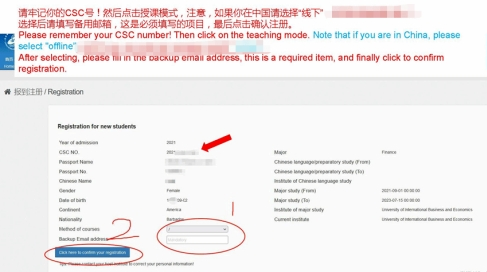
步骤4:请牢记你的CSC号!选择后请填写备用邮箱,这是必须填写的项目,最后点击确认注册。
Step 4:Please remember your CSC number! After selecting, please fill in the backup email address, which is a required item. Finally, click to confirm registration.